
 Home
Home About NANTECH
 Our Products
 Our Services
 Projects
 Customized Software
 Website Design and Development
 E-Commerce Development
 Search Engine Optimization (SEO)
 Mobile Application Development
 Our Clients
 Career
 Reviews
 Events
 Contact Us


Copyright 2014-2026. All Rights Reserved
ComfiBiz is a complete cloud-based business solution developed by NANTECH Solutions, designed to simplify accounting and operations for multiple businesses. Get a real-time overview of operations: branch performance, inventory, item-wise stock levels, taxation, instant print, ledgers, and key financial reports — all in one application.

NANTECH provides a wide range of Masters that businesses can customize based on their needs. These include Branch, Inventory, Ledger, Users, User Role Management, Godown, and more — all designed to structure operations efficiently. Creating and managing these masters ensures that your system is well-organized, making day-to-day transactions smoother and more accurate across departments and locations.
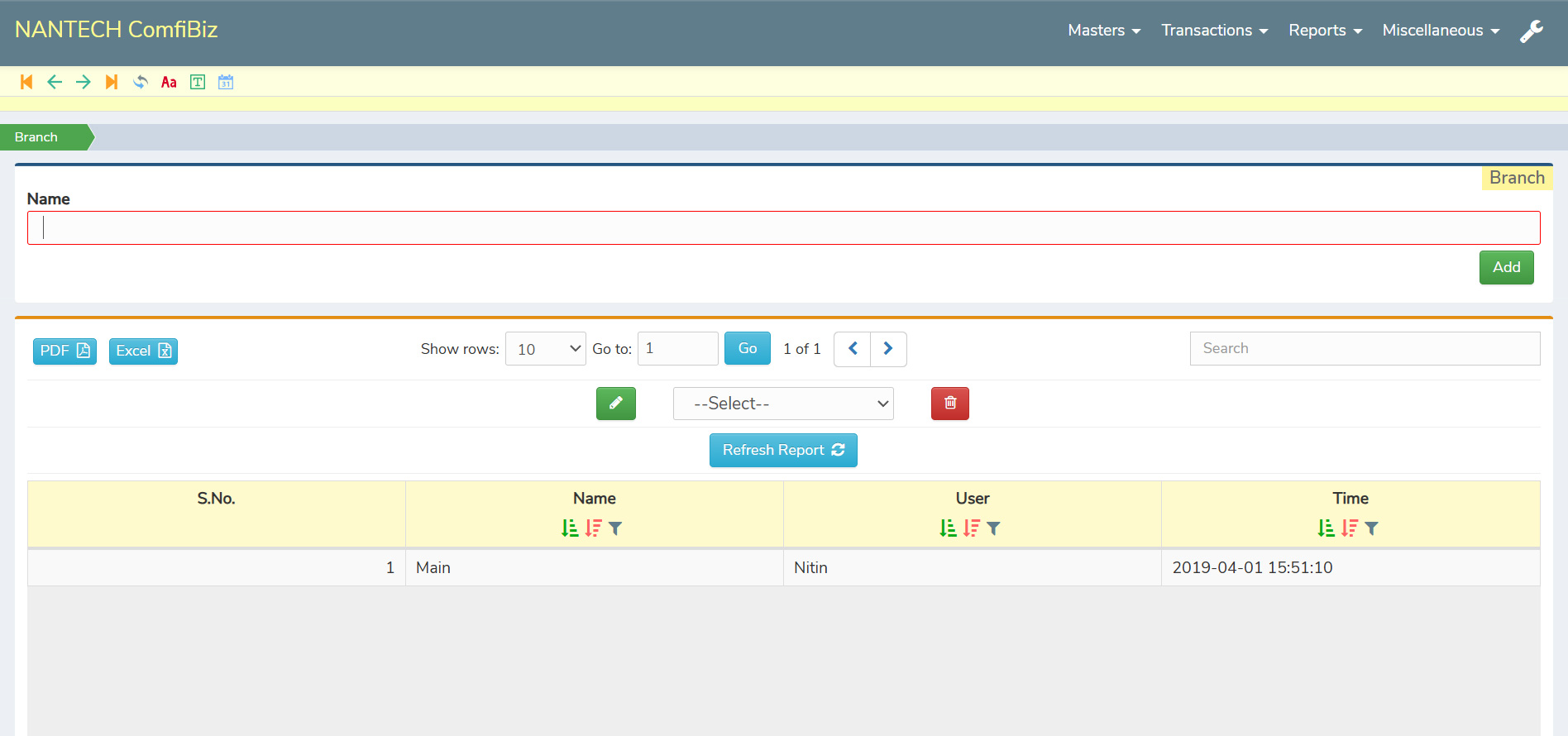
ComfiBiz allows businesses to create and manage multiple branches seamlessly through its dedicated branch master. This master acts as the foundation for all operations, enabling users to segregate transactions, inventory, and reports branch-wise. Each branch functions independently within the system, ensuring clarity in day-to-day operations and helping businesses avoid data overlap.
Once a branch is added, users can assign specific entries like sales, purchases, inventory, ledgers, and users to that branch. This makes it easy for companies with multiple outlets to operate without confusion, as all relevant data is linked directly to the selected branch. The dashboard and reporting features also allow users to view performance branch-wise, giving management better control and insights.
Whether you're operating a single outlet or a chain of locations, the branch module in ComfiBiz brings structure and simplifies multi-location management. It’s especially useful for businesses aiming to scale, offering centralized control with the flexibility to customize operations for each individual branch.
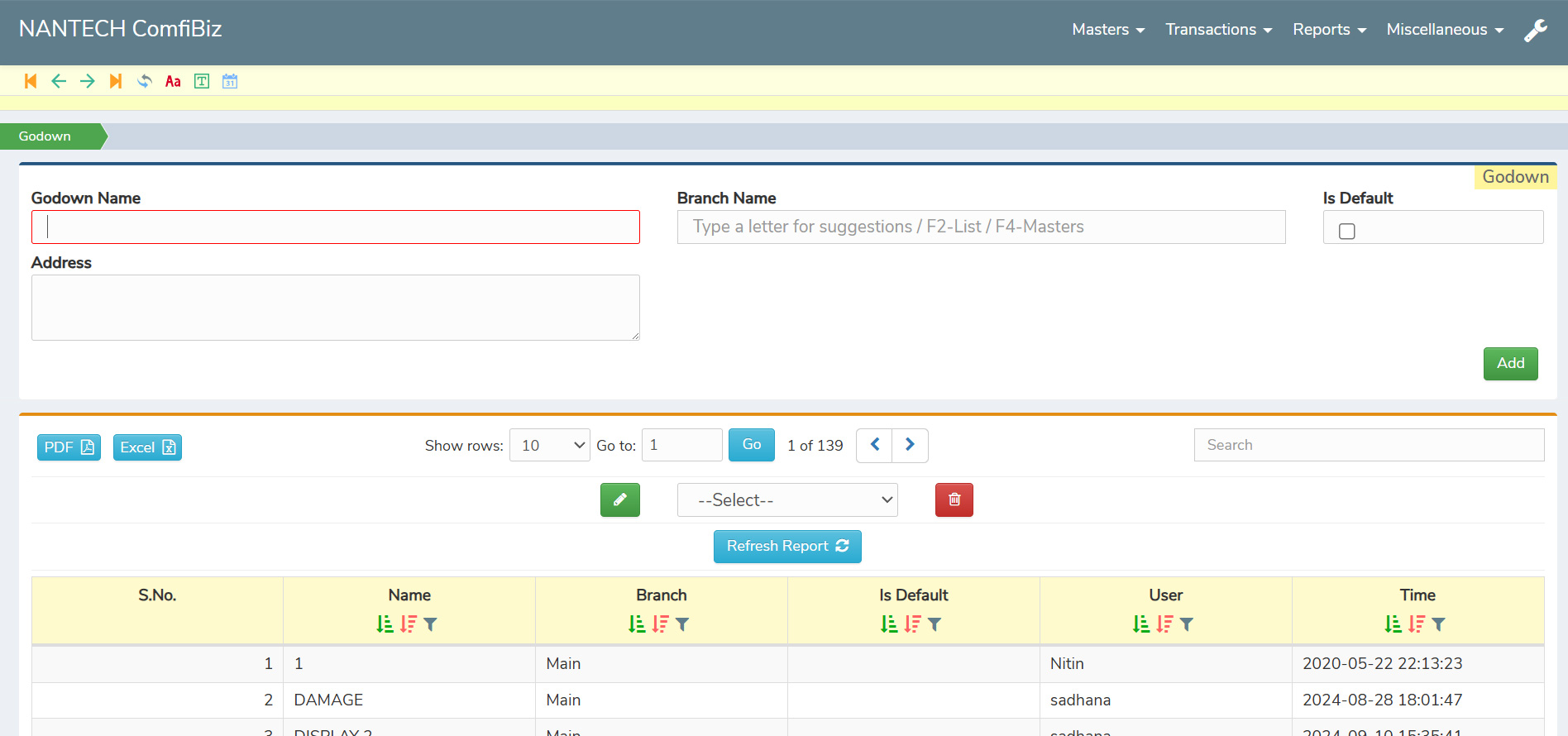
Another important master in ComfiBiz is the Godown, which helps businesses manage multiple storage locations effectively. Each godown can be created and linked to a specific branch for better inventory control.
Each transaction — whether purchase, sales, stock transfer, or adjustment — can be linked to a specific godown. This feature helps businesses track stock movement accurately, avoid duplication, and maintain real-time visibility of item-wise stock levels across all storage points. It also supports safety stock alerts and inventory control measures.
For businesses dealing with large inventories or operating across multiple sites, the godown module in ComfiBiz simplifies stock management and adds accountability. From better planning to smoother dispatch operations, it ensures that every item is right where it should be — improving both efficiency and decision-making.
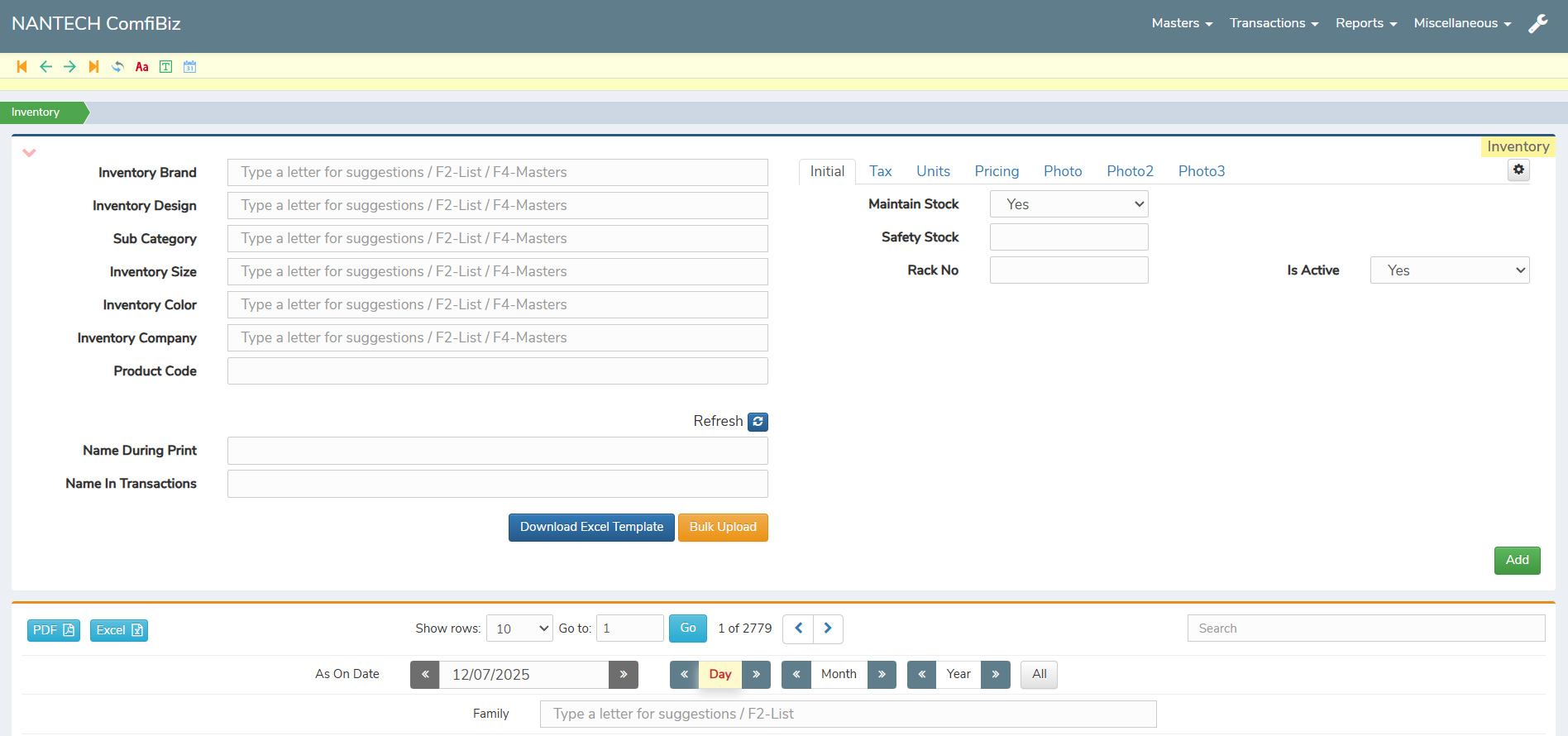
ComfiBiz offers a smart and easy-to-use inventory system that helps businesses manage their stock efficiently. It allows you to track what items are in hand, what’s been sold, and when you need to reorder — all from a single, organized platform. If an item isn’t found while working, you can instantly search and add it to the master, making the process smooth and quick.
It shows you the stock available in each godown or location, so you always know where your products are. You can also see the full history of each item and get alerts when stock is running low. This helps you avoid both overbuying and running out of items.
With ComfiBiz, inventory management becomes simple and stress-free. You save time, reduce mistakes, and keep your business running smoothly — with the right stock always ready when you need it.
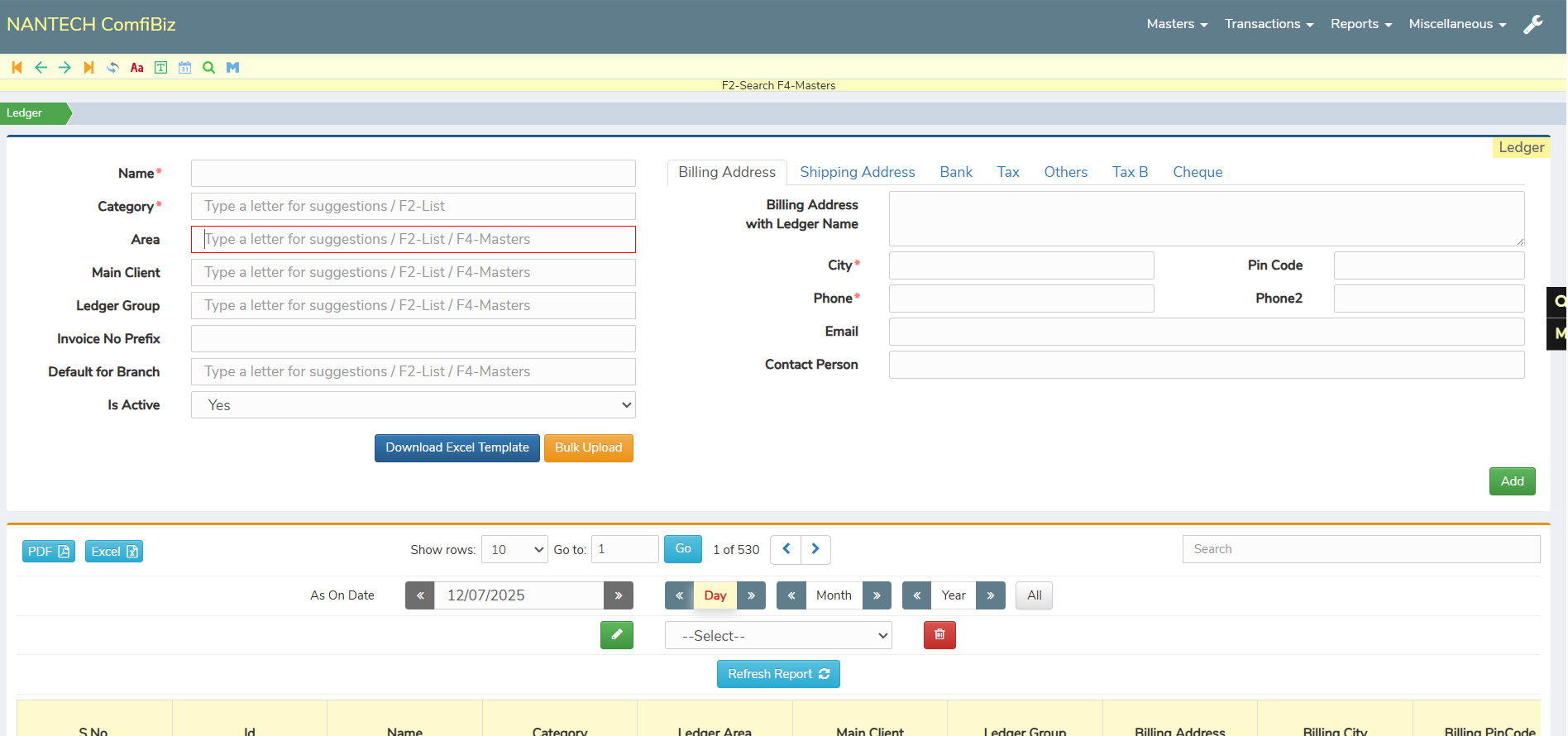
ComfiBiz helps you manage all your ledgers in one place — whether it’s for customers, suppliers, expenses, or incomes. You can create different types of ledgers under categories like assets, liabilities, capital, income, or expenses, and use them easily during transactions.
If you forget to create a ledger before starting a transaction, there’s no need to worry. ComfiBiz allows you to add a new ledger instantly while working, so you don’t have to stop or go back. This saves time and keeps your work flowing smoothly.
The system also keeps all your ledger entries neatly recorded, so you can view balances, check details, and track your financials anytime. With clear reports and organized data, managing accounts becomes simple — even if you’re not from an accounting background.
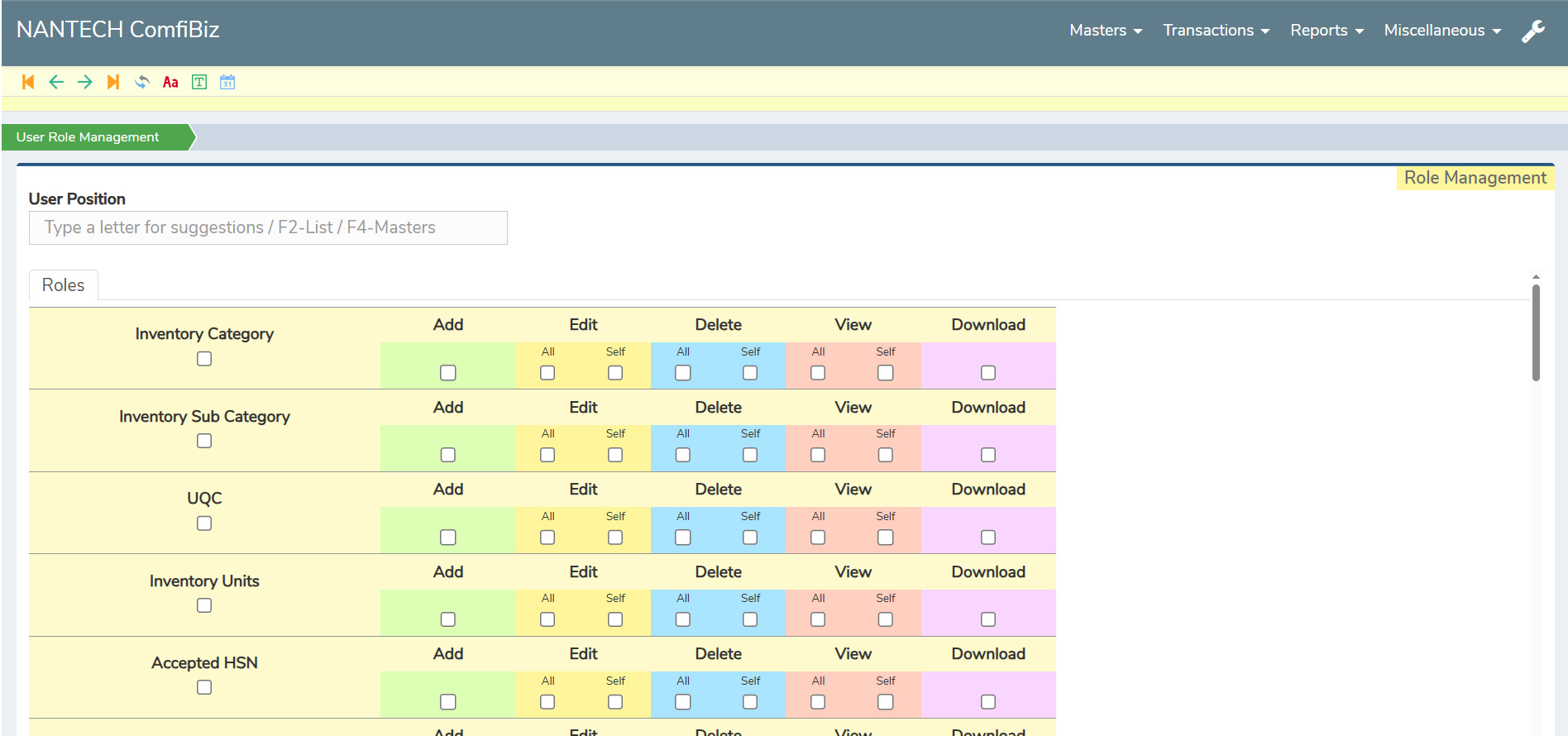
ComfiBiz includes a User Role Management feature that helps you control who can access what in your business software. As an admin, you can create users for your team and assign specific roles with limited access based on their responsibilities.
This means your staff will only see and work on the sections they need — like sales, inventory, or billing — while sensitive data stays protected. It prevents confusion, avoids overlapping work, and helps maintain clear accountability.
Whether you have one staff member or a large team, this feature keeps your operations organized and secure, giving you full control without the risk of data misuse.
ComfiBiz makes handling business transactions simple and organized. Whether it's sales, purchases, payments, receipts, or transfers, every entry is recorded clearly and linked to the right branch, ledger, and inventory. With easy data entry, real-time updates, and the ability to attach remarks or details, users can manage day-to-day operations smoothly while maintaining accurate records.
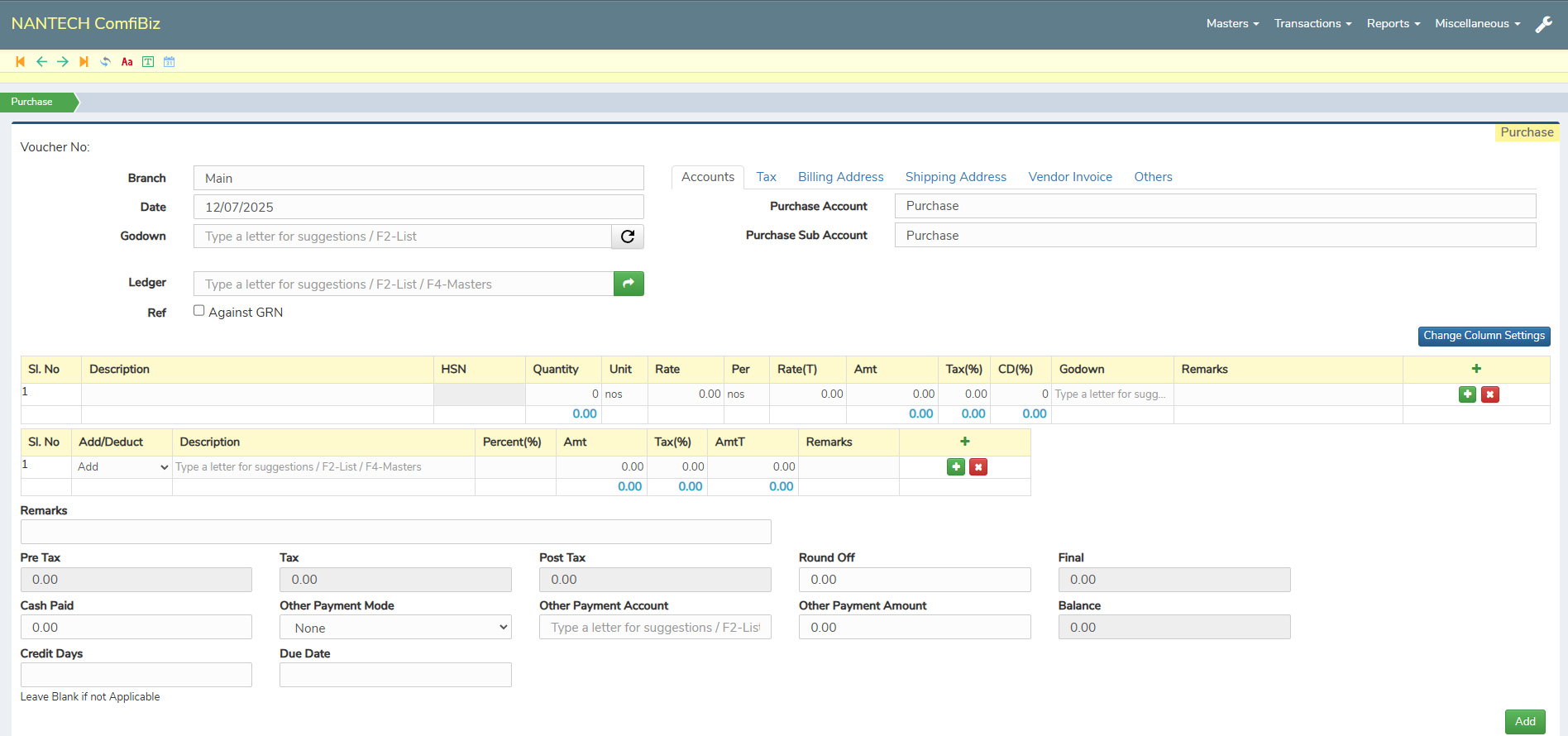
ComfiBiz lets you record purchase orders seamlessly by entering product details, quantities, and rates in just a few clicks. This makes the ordering process simple, fast, and accurate — especially useful for businesses handling regular procurement.
For sales, the platform makes daily billing effortless with pre-set product rates, tax options, and godown selection. You can easily include both shipping and billing addresses, along with relevant bank details, ensuring every invoice is complete and well-documented.
Both purchase and sales entries can be exported instantly in PDF or Excel formats, with all details neatly organized. This not only helps in record-keeping and sharing but also supports better transparency and professional documentation.
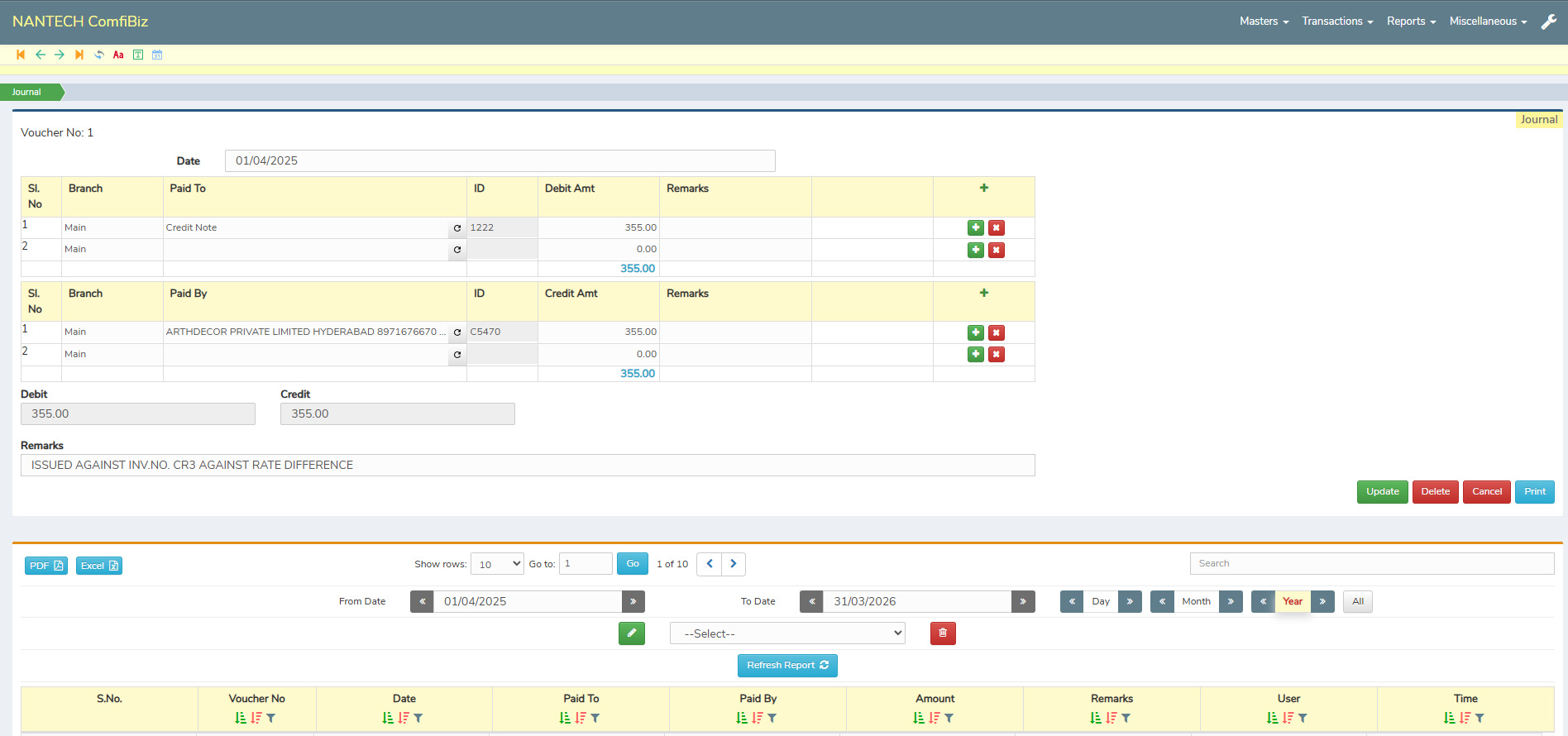
The Journal Transactions section in ComfiBiz is designed to record your daily financial entries in an organized and transparent manner. It displays transactions in chronological order, with clear details like date, description, and the related debit and credit ledgers — helping maintain accurate books.
Users can easily add entries by selecting the right ledgers, entering the amounts, and writing remarks for better clarity. Whether it’s a simple transfer, a correction, or any internal transaction, everything is recorded smoothly within this section — keeping your accounts up to date every day.
With all journal records properly maintained, businesses benefit from clean reporting and simplified audits. ComfiBiz makes it easy even for those new to accounting, ensuring that daily financial tracking is stress-free, reliable, and always accessible.
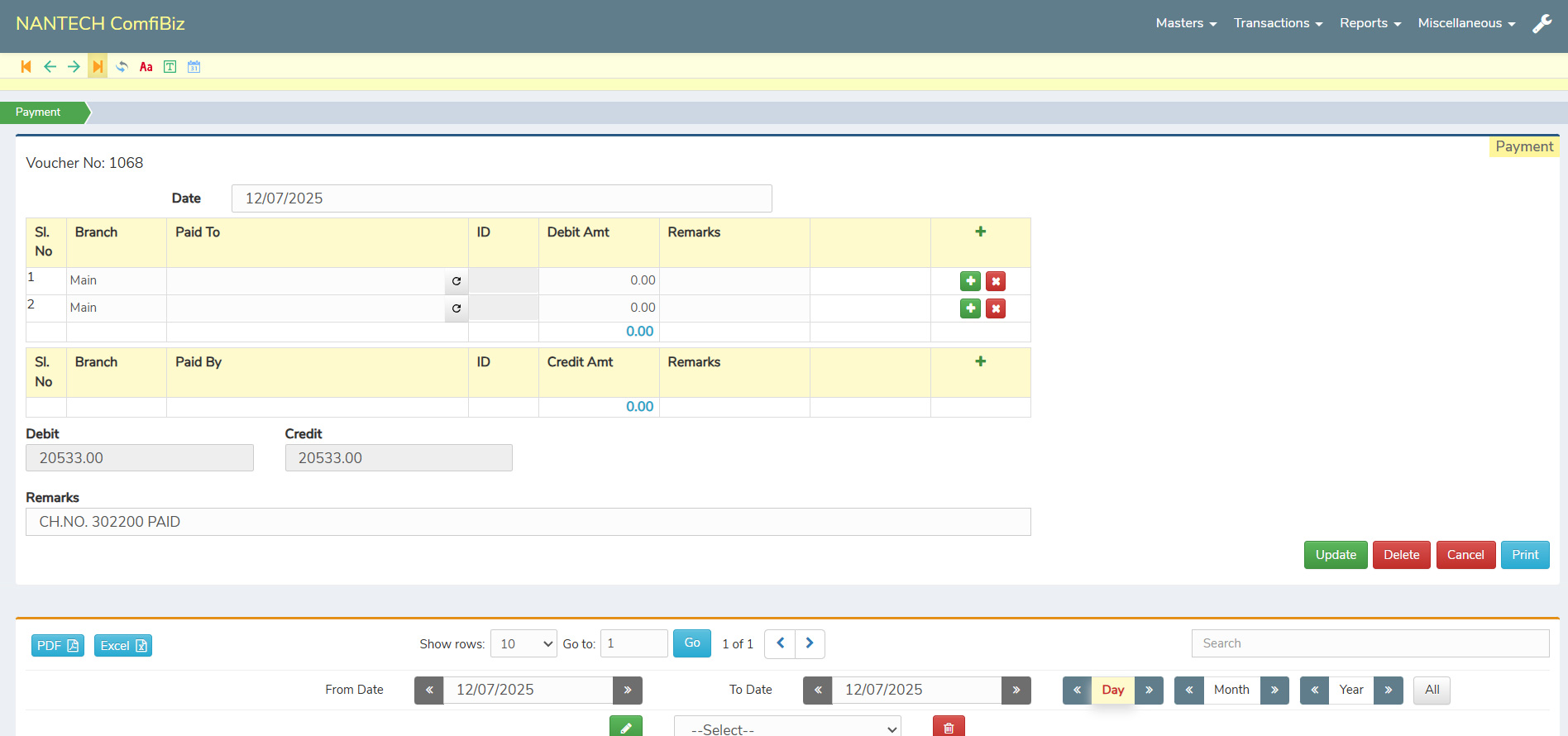
The Payment and Receipt section in ComfiBiz allows users to record and track all transactions—whether done through cash, bank, or credit—with ease. It captures key information such as Serial Number, Branch, Party Name, Transaction ID, Amount, and Remarks in a well-organized format, ensuring clarity in every entry.
This structured layout helps businesses monitor their incoming and outgoing payments with full transparency. By offering detailed records and linking each transaction to the correct branch and ledger, ComfiBiz supports accurate financial tracking and easier reconciliation.
To further simplify reporting, all entries in this section can be exported in PDF or Excel format. This makes it convenient to analyze data, share with teams or accountants, and maintain proper documentation for audits or internal review.
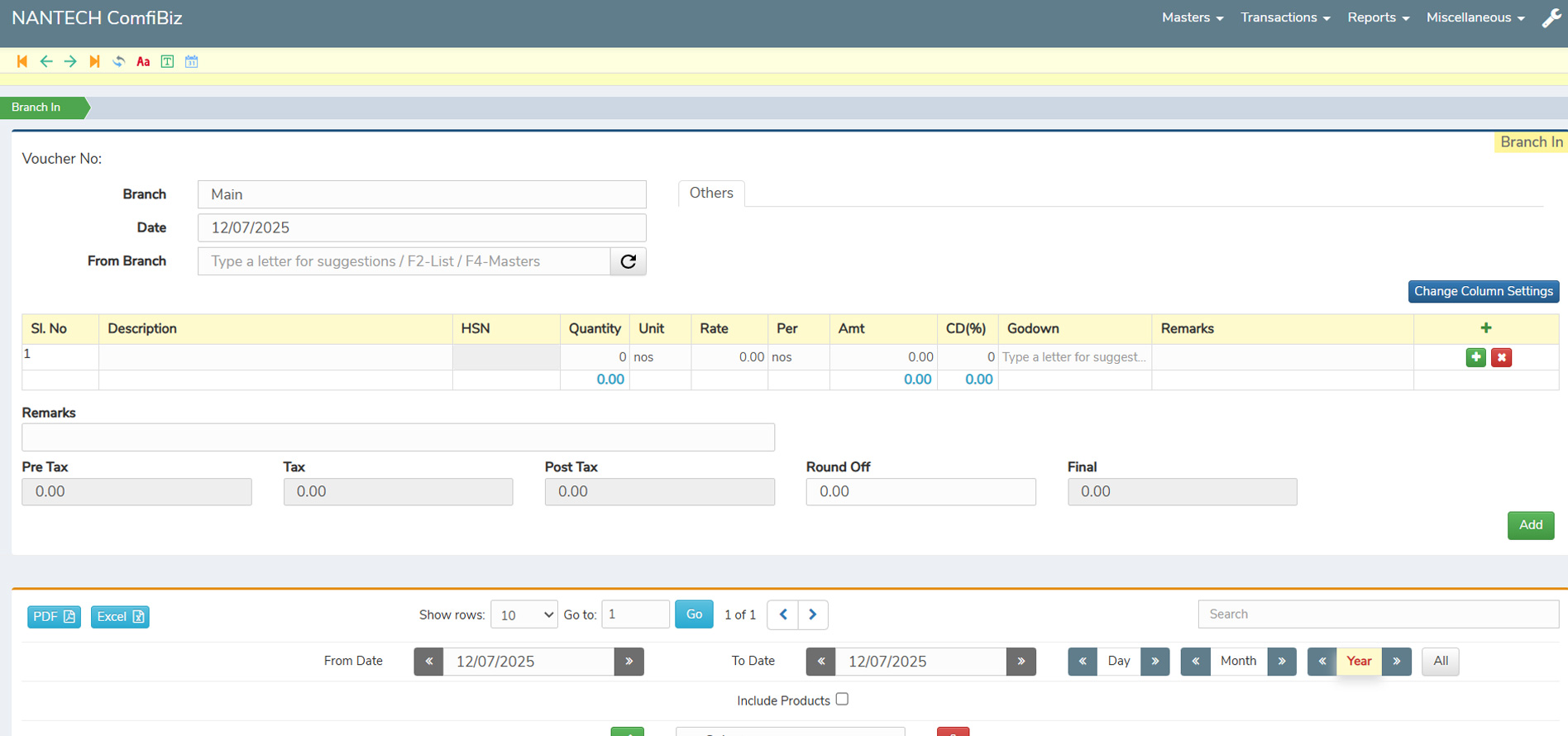
The Transaction Section in ComfiBiz handles the smooth transfer of goods between branches using detailed records that include Branch In and Branch Out. Each transaction captures essential data such as Sl. No, Description, HSN, Quantity, Unit, Rate, Per, Amount, CD(%), Godown, and Remarks — ensuring complete transparency and traceability.
This feature helps businesses manage stock movement across locations with ease. By clearly documenting each transaction, it ensures accurate inventory tracking and prevents confusion or misplacement of goods between branches.
All inter-branch transfer records can be easily exported in PDF or Excel format, making it simple to review, share, or store the data for audits or internal use. It brings efficiency, accuracy, and traceability to everyday inventory operations.
Generate key reports like P&L, Balance Sheet, Trial Balance, and Day Book with just a few clicks. Get GST-inclusive/exclusive formats that are audit-ready and easy to share for smooth tax filing and compliance.
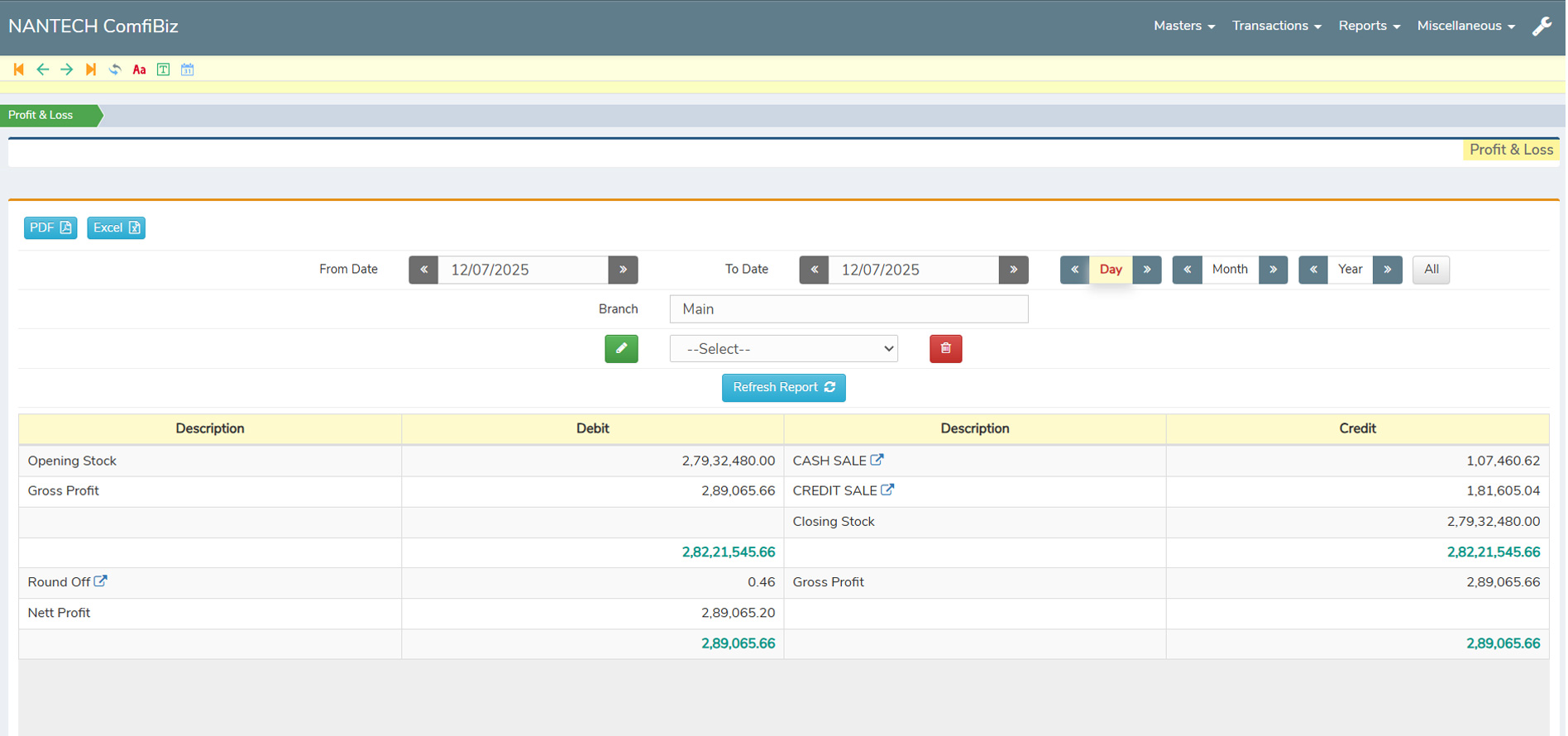
The Profit and Loss Statement in ComfiBiz gives a clear summary of your business’s financial performance by displaying all income and expenses within a selected time frame. It allows users to filter and adjust dates as needed, making it easy to generate reports for any period — whether weekly, monthly, or yearly..
All key components such as sales, purchases, direct and indirect expenses, and other incomes are automatically calculated and presented in an organized format. This helps businesses quickly understand where they are earning and spending, supporting better financial decisions.
The report is easy to read and can be exported in PDF or Excel format for sharing or record-keeping. Whether you’re preparing for a review, audit, or just tracking progress, the Profit and Loss feature keeps your financial data at your fingertips with accuracy and ease.
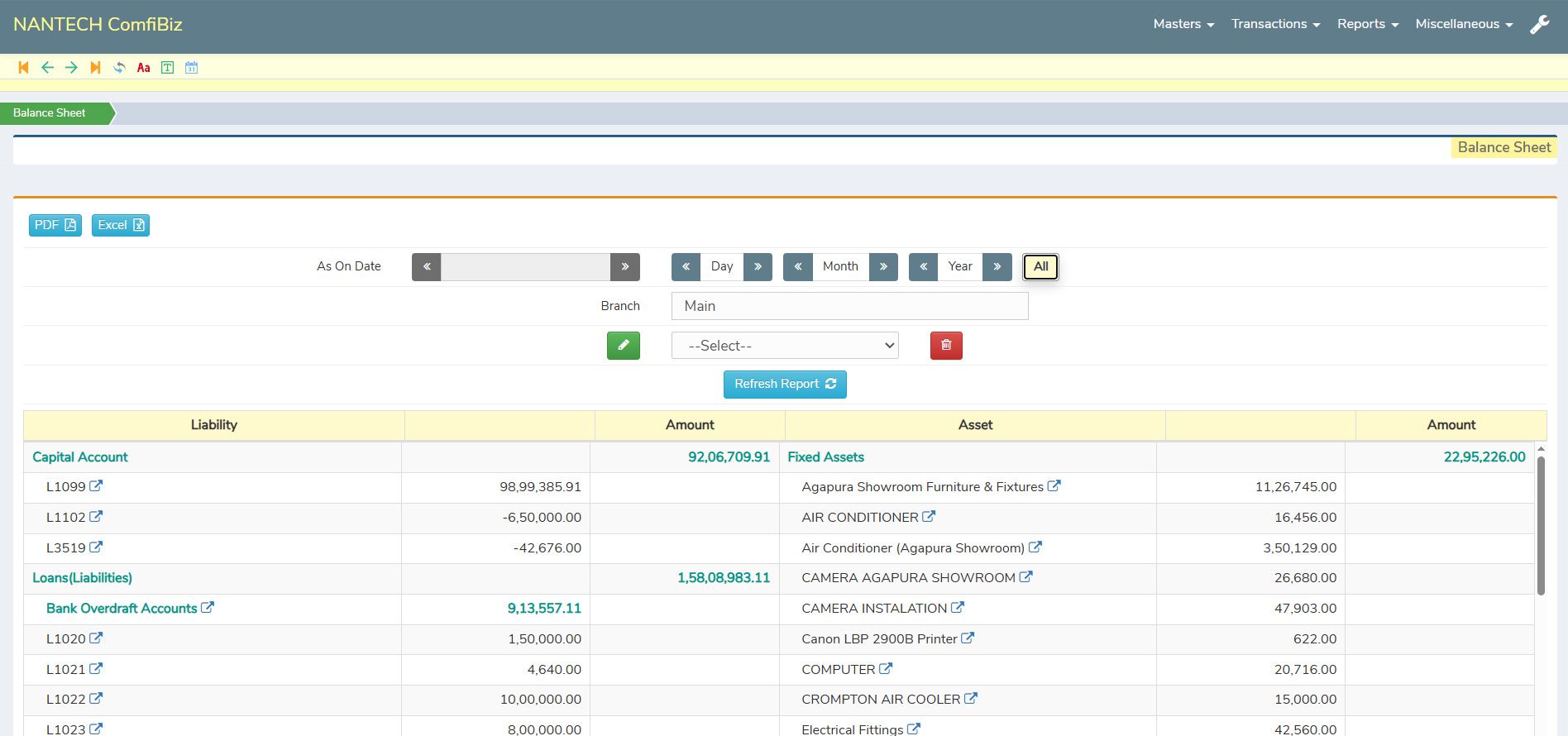
The Balance Sheet in ComfiBiz provides a complete view of your company’s financial position by organizing your assets, liabilities, and capital in a clear, structured format. Users can select custom date ranges to see how their business stands at any point in time, helping them make informed strategic decisions.
A unique feature of ComfiBiz is its ability to generate branch-wise balance sheets, allowing you to view the financial standing of each location separately. This helps multi-branch businesses compare performance, manage resources better, and maintain localized financial clarity.
To enhance usability, each item in the balance sheet is clickable — taking you directly to its corresponding ledger for deeper insights. The report is exportable in PDF or Excel, making it easy to share with stakeholders or use for audits and internal reviews.
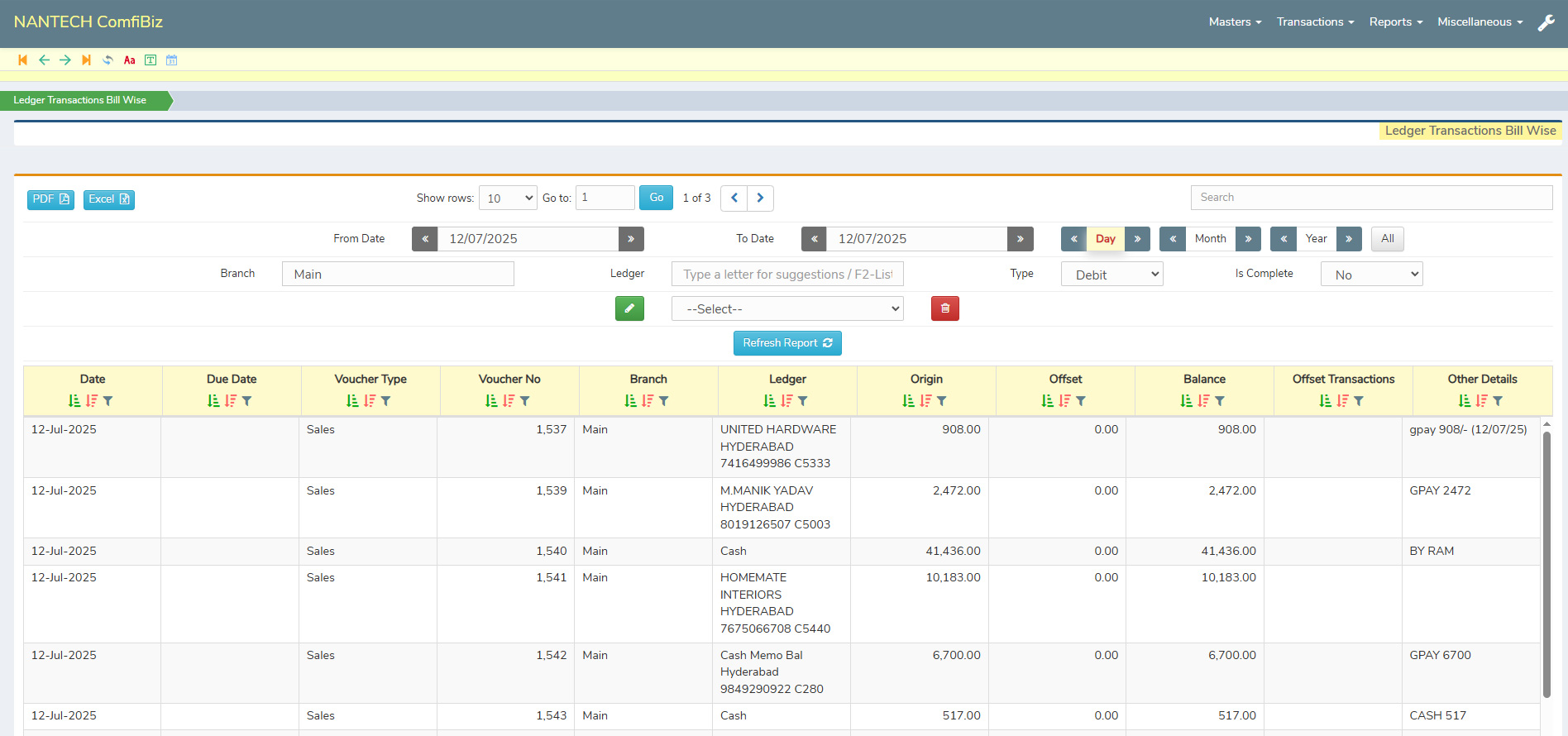
The Reporting Section in ComfiBiz allows users to filter, search, and sort data across all reports with ease. You can quickly find relevant entries by date, ledger, item,branch, and more.
This section helps businesses manage their cash flow with ease, offering clear visibility into each transaction. All records can be exported in PDF or Excel, making it simple to audit, analyze, or share when needed.
All reports are fully customizable based on client needs, offering flexibility in layout, filters, date ranges, and output formats (PDF/Excel) — ensuring every business gets the insights they need, exactly how they need them.
Please feel free to contact us and let us discuss over a cup of coffee
Second Floor, Rokhade Building,
Beside Sukruti Commerce College,
Shirur Park Main Road, Vidya Nagar,
Hubli. Karnataka 580021 , India.


