
 Home
Home About NANTECH
 Our Products
 Our Services
 Projects
 Customized Software
 Website Design and Development
 E-Commerce Development
 Search Engine Optimization (SEO)
 Mobile Application Development
 Our Clients
 Career
 Reviews
 Events
 Contact Us


Copyright 2014-2026. All Rights Reserved
A modern web-based application designed to streamline the daily operations of swimming pool facilities. From managing user roles and tracking coaching enrollments to handling billing and sales, the system is tailored to meet the specific needs of sports and recreation centers, ensuring efficient and organized management.

The web application includes essential master modules like Expense Head, Items, Users, User Role Management, and User Positions. These masters help the admin define categories, manage staff access levels, and organize inventory efficiently. By setting these up in advance, it ensures smooth operations, better role clarity, and accurate expense tracking.
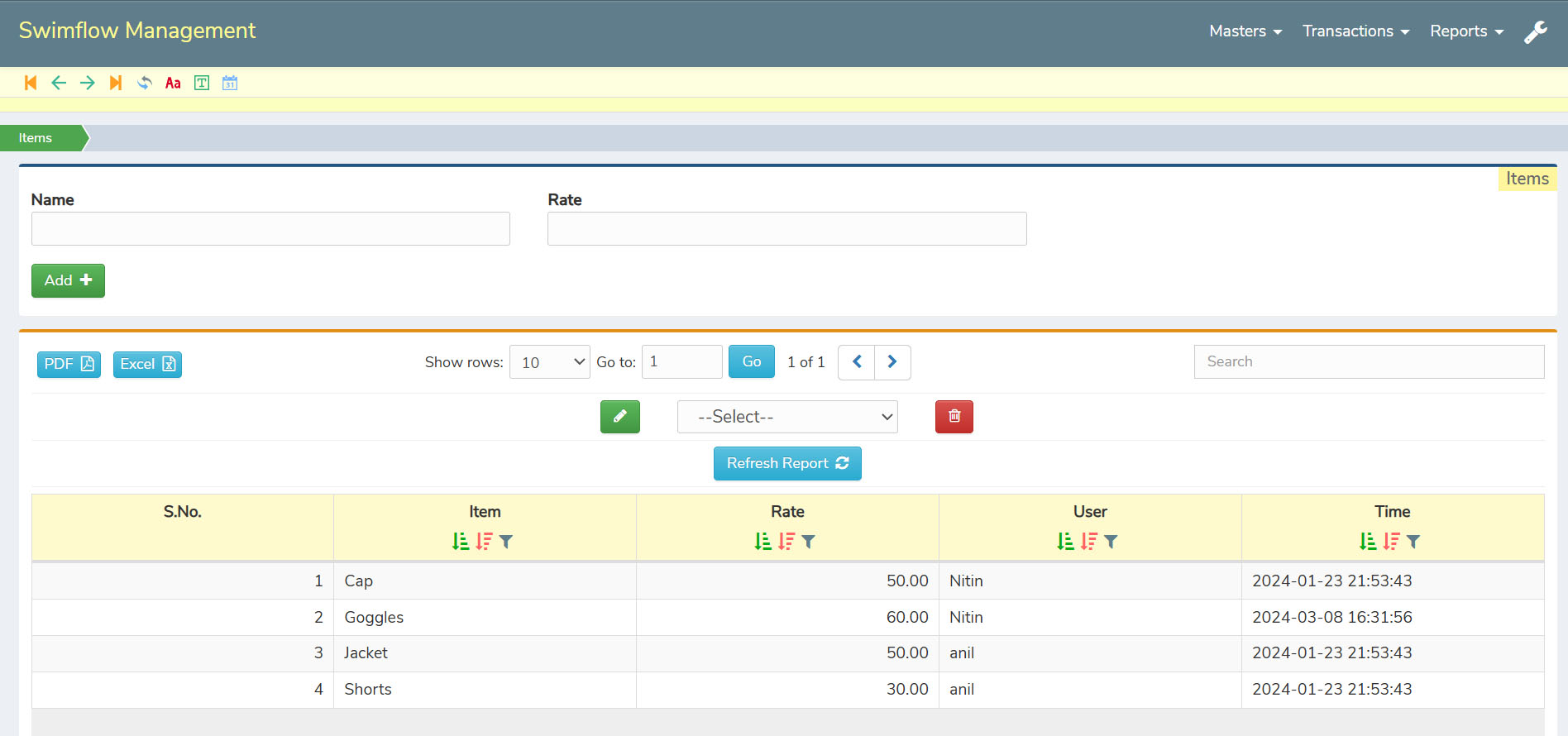
The Items master in the web application is designed to manage all the equipment used for swimming activities. From goggles and floats to kickboards and training aids, every piece of equipment can be added and organized efficiently. This ensures that all items are readily available for selection and tracking whenever needed.
Each equipment item can have predefined rates and be created under different profiles for better categorization. This makes it easier to manage pricing, track availability, and maintain clarity across various swimming equipment maintained at the facility.
For added convenience, the complete list of items can be exported in PDF or Excel format, allowing admins to share, review, or print detailed records anytime. This makes the management of swimming pool equipment both structured and easily accessible.
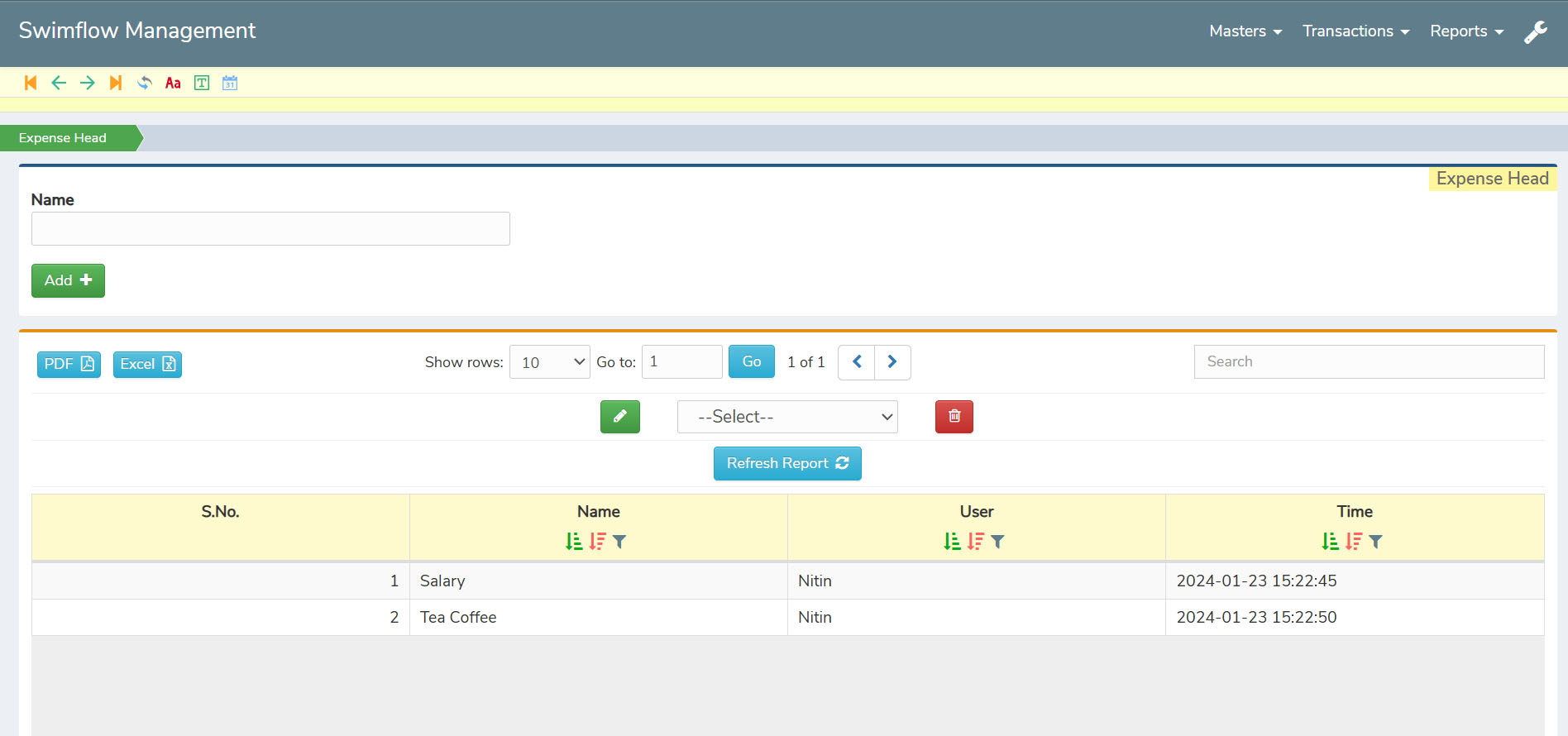
The Expense Head master in the web application helps categorize and manage all types of expenses related to the swimming pool facility. From maintenance and cleaning to staff wages or equipment repairs, each expense type can be predefined for easy reference. This ensures a clear structure for tracking and managing operational costs.
By creating these expense heads in advance, admins can save time during daily transactions, as they can simply select the relevant category instead of entering details repeatedly. This reduces errors, speeds up expense recording, and keeps financial data organized.
For better record-keeping, all expense head details can be exported in PDF or Excel format, making it easy to review, analyze, or share financial summaries whenever needed. This improves overall expense management and reporting efficiency.
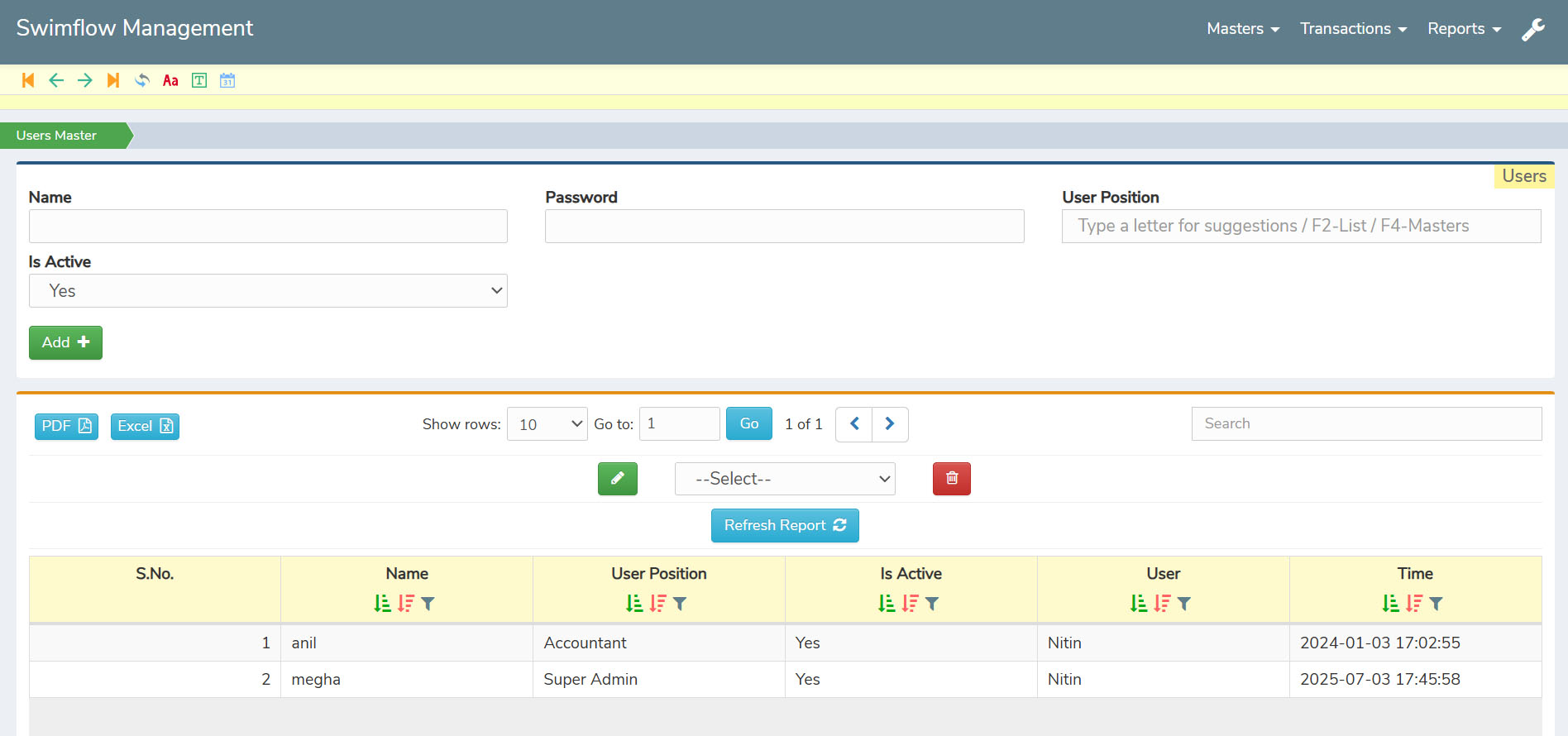
The Users master in the web application allows the admin to add and manage all staff members who operate within the system. Each user can be registered with their basic details, and their status can be marked as active or inactive as needed. This ensures proper tracking of who is currently part of the operations.
Admins can also specify each user’s position by linking them to the User Position master, creating a clear hierarchy within the facility. Additionally, unique passwords can be assigned to every user to maintain privacy and confidentiality, ensuring secure access to the system.
All user details, including their status, position, and login credentials, can be managed seamlessly and even exported in PDF or Excel format for record-keeping. This structured setup helps maintain transparency, security, and smooth coordination among the staff.
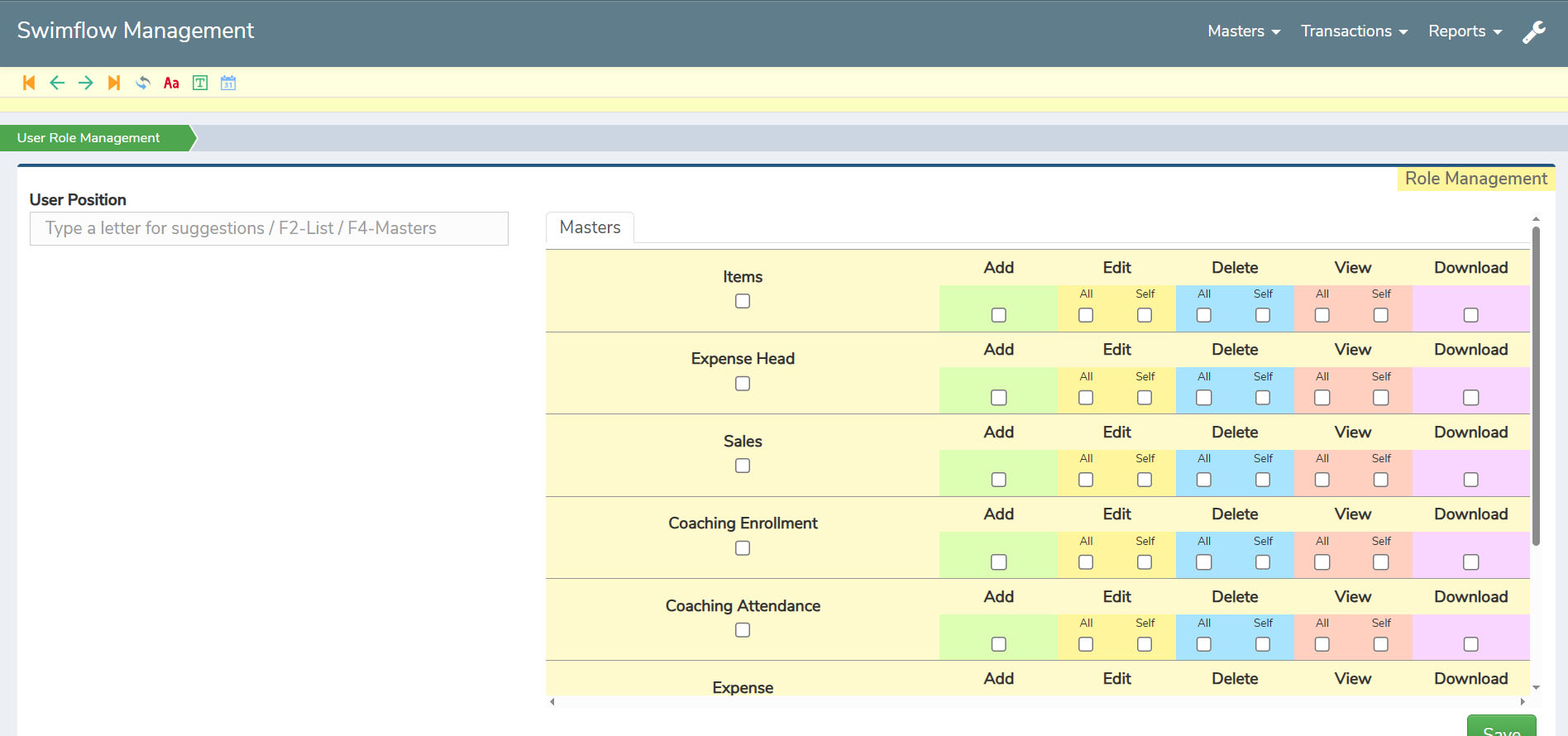
The User Role Management feature allows the admin to define and control what each user can access within the web application. Roles can be created based on responsibilities, ensuring that staff members only see and work on the sections relevant to their tasks. This minimizes confusion and helps maintain a clear workflow.
By assigning specific roles, the admin can restrict or grant permissions to sensitive data like financial details, bookings, or expense records. This not only improves data security but also prevents overlapping of work, ensuring everyone focuses on their assigned duties.
All role-based settings are easy to update and manage, making it flexible for any organizational changes. With proper role management, the swimming pool operations remain organized, secure, and efficient.
The Transactions section handles all the day-to-day activities seamlessly. From selling tickets and accessories to managing advance or balance payments, coaching enrollments, attendance tracking, and recording expenses, everything is designed to be simple yet detailed. Each transaction captures all necessary data, ensuring complete transparency and better operational control.
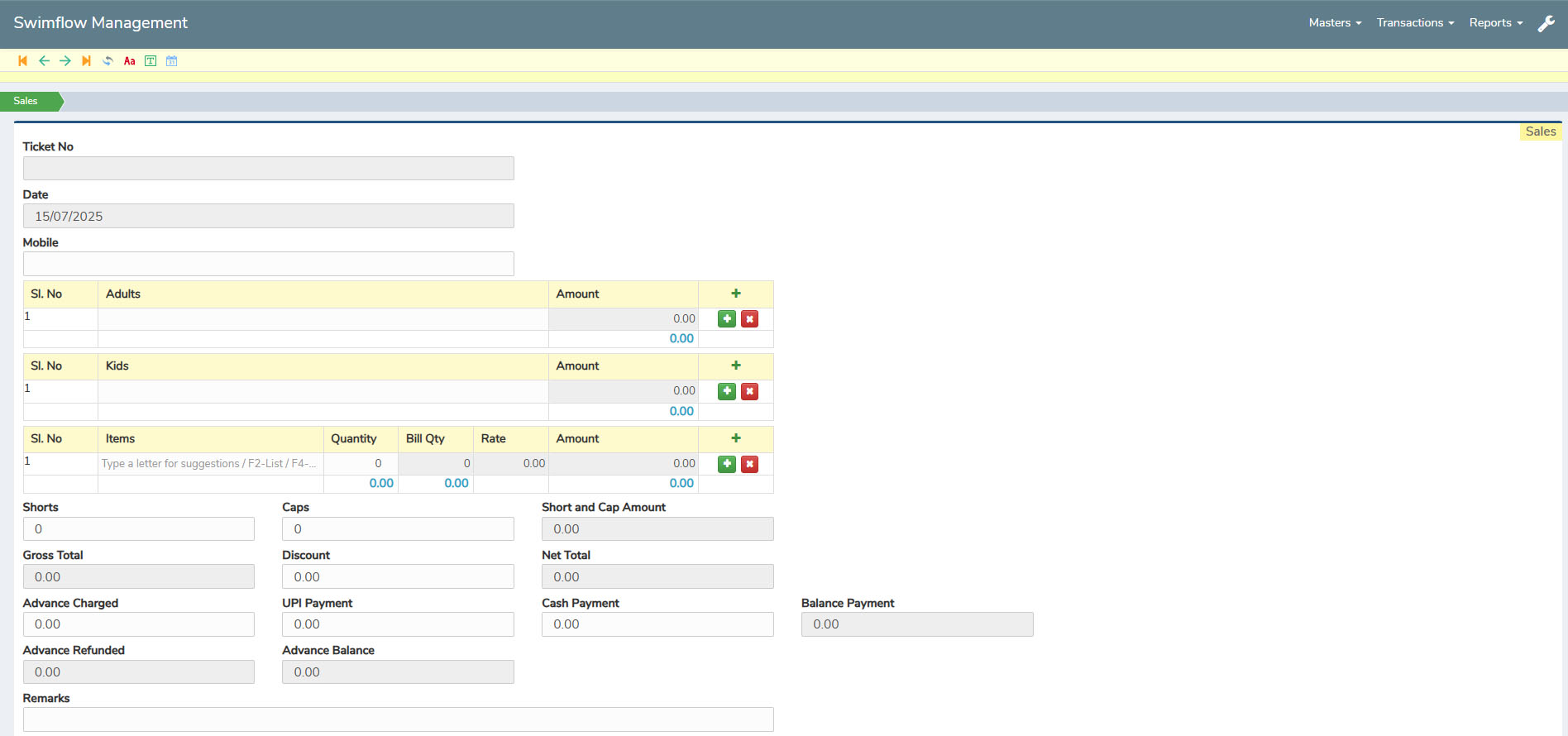
The Sales section in Transactions allows easy recording of all sales, from swimming accessories to tickets. It even manages advance payments and balance payments, ensuring complete clarity of each transaction. All necessary details are captured in an organized format to avoid confusion during billing.
To make ticketing more convenient, the system offers categorization for adult and kids tickets, making it easy to select the right option while processing sales. It also prompts for important details like the customer’s name and mobile number, helping maintain accurate records for future reference.
This structured approach ensures that every sale—whether for accessories or entry tickets—is properly tracked. All sales records can also be exported in PDF or Excel format, making it simple to review, share, or maintain clear documentation.
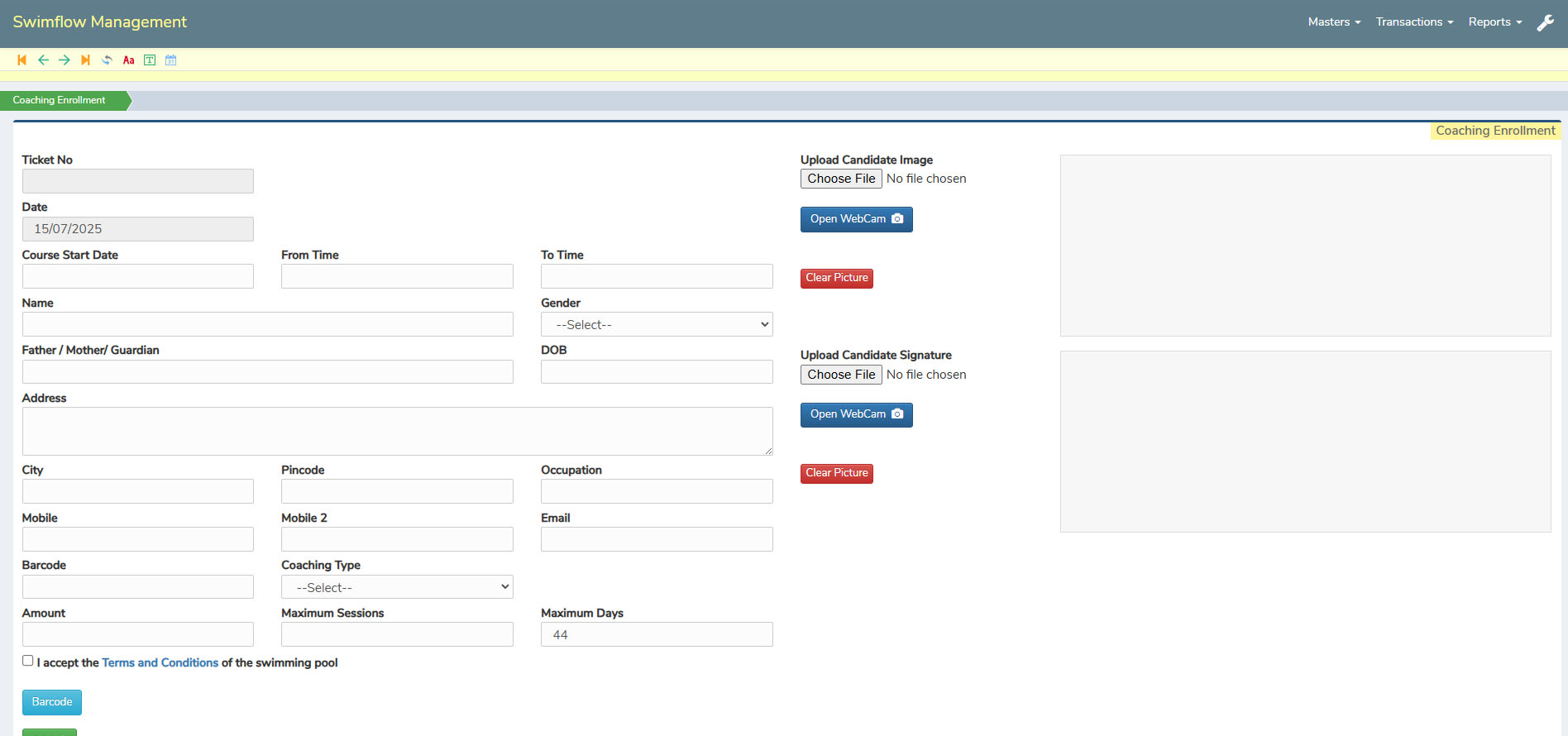
The Coaching Enrollment section is designed to simplify the process of registering students for swimming coaching. It asks for all the required and important details to ensure accurate record-keeping and smooth enrollment. This helps staff maintain complete information for each participant without missing any critical data.
A unique feature is the ability to upload images either by selecting from files or directly using the webcam, making it quick and convenient to add student photos during enrollment. There’s also a terms and conditions option that can be acknowledged, ensuring clarity and agreement between the facility and the student.
To make document handling even easier, the system includes a barcode generation feature, allowing staff to quickly scan and create enrollment documents without manual effort. All these features together make coaching enrollment efficient, accurate, and professional.
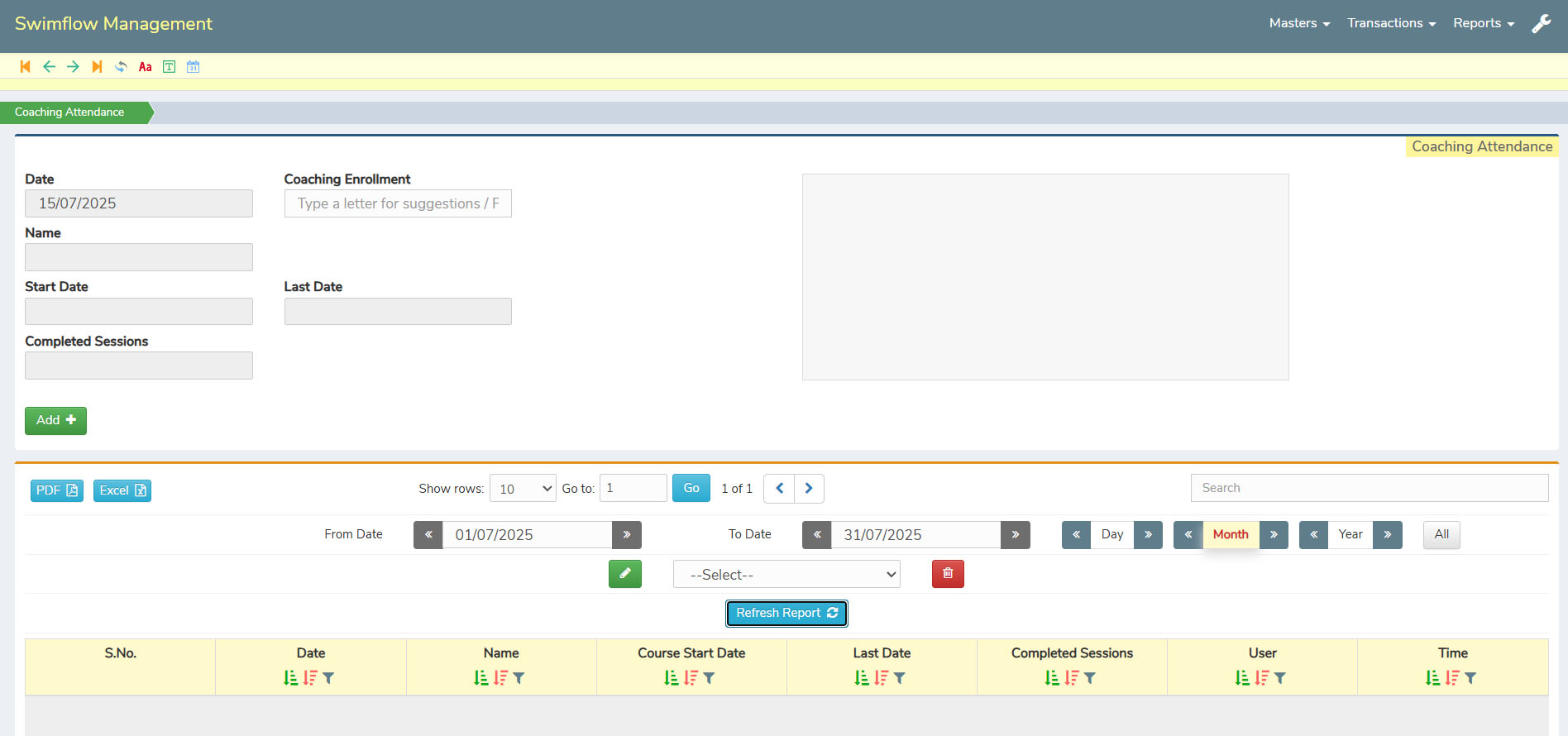
The Coaching Attendance section provides a clear and organized view of all enrolled participants. It displays the relevant customer details along with their images, making it easy for staff to quickly identify each individual. The page also shows the scheduled sessions and their corresponding dates for better tracking.
To monitor attendance more effectively, the system allows staff to adjust the time period and generate reports based on the selected range. This helps in analyzing attendance trends, tracking participation, and maintaining proper records for each student.
Additionally, it highlights the number of completed sessions for each customer, ensuring transparency and easy follow-up on pending sessions. This structured attendance tracking improves coaching management and enhances the overall customer experience.
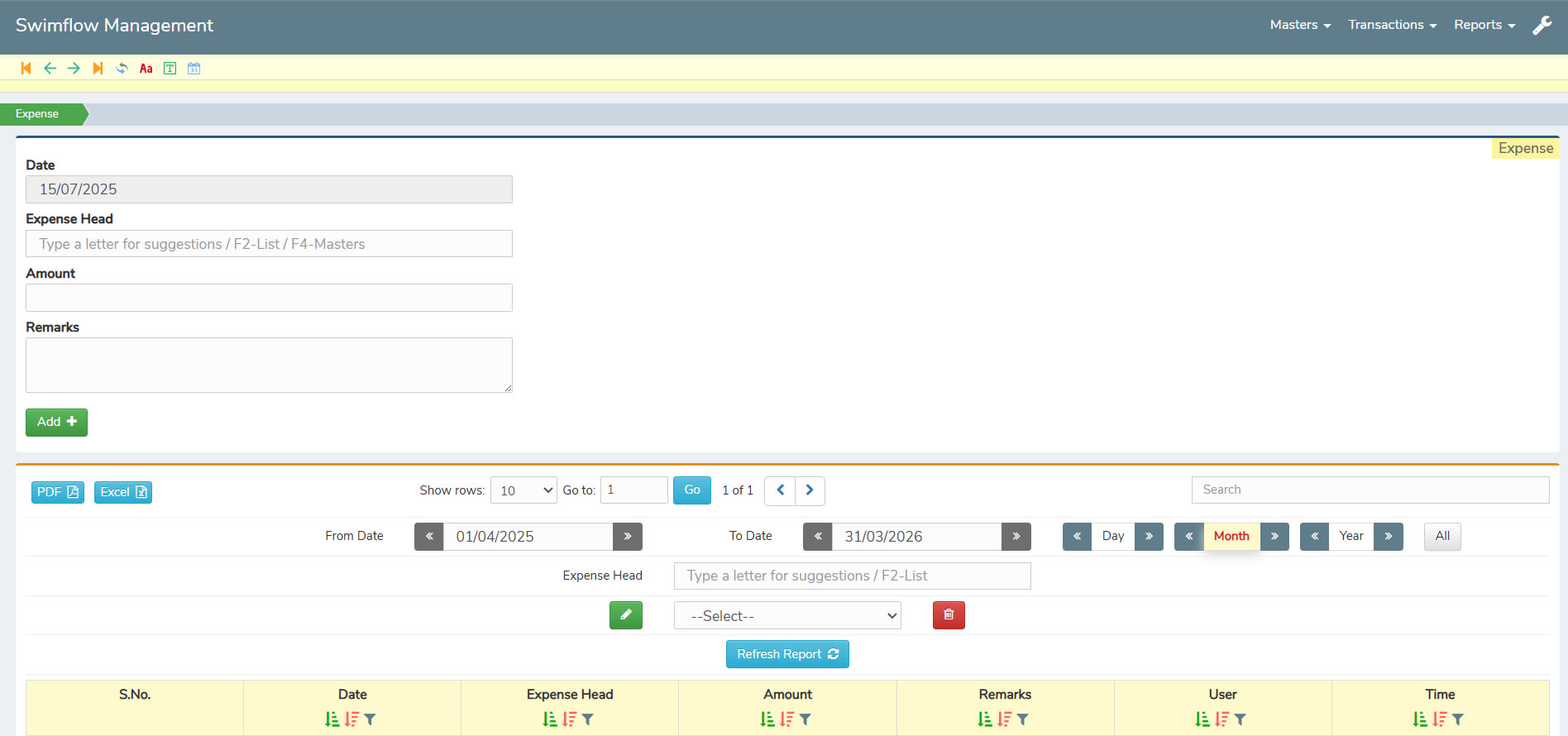
The Expense section allows staff to easily record and manage all operational costs. You can select the predefined expense head from the master, enter the exact amount, and add detailed remarks to ensure the reason for each expense is clearly documented. This keeps expense tracking organized and transparent.
The system also provides an option to sort expenses by specific time slots, making it easier to review spending patterns over a chosen period. This helps in analyzing costs effectively and maintaining better financial control.
For reporting and record-keeping, all expense details can be exported in Excel or PDF format, ensuring quick sharing, auditing, or storage whenever needed. This makes expense management simple, structured, and efficient.
The Reports section provides a clear view of sales, coaching, and expenses with easy filtering and sorting options. All reports can be exported in PDF or Excel, making it simple to analyze, audit, or share whenever needed.
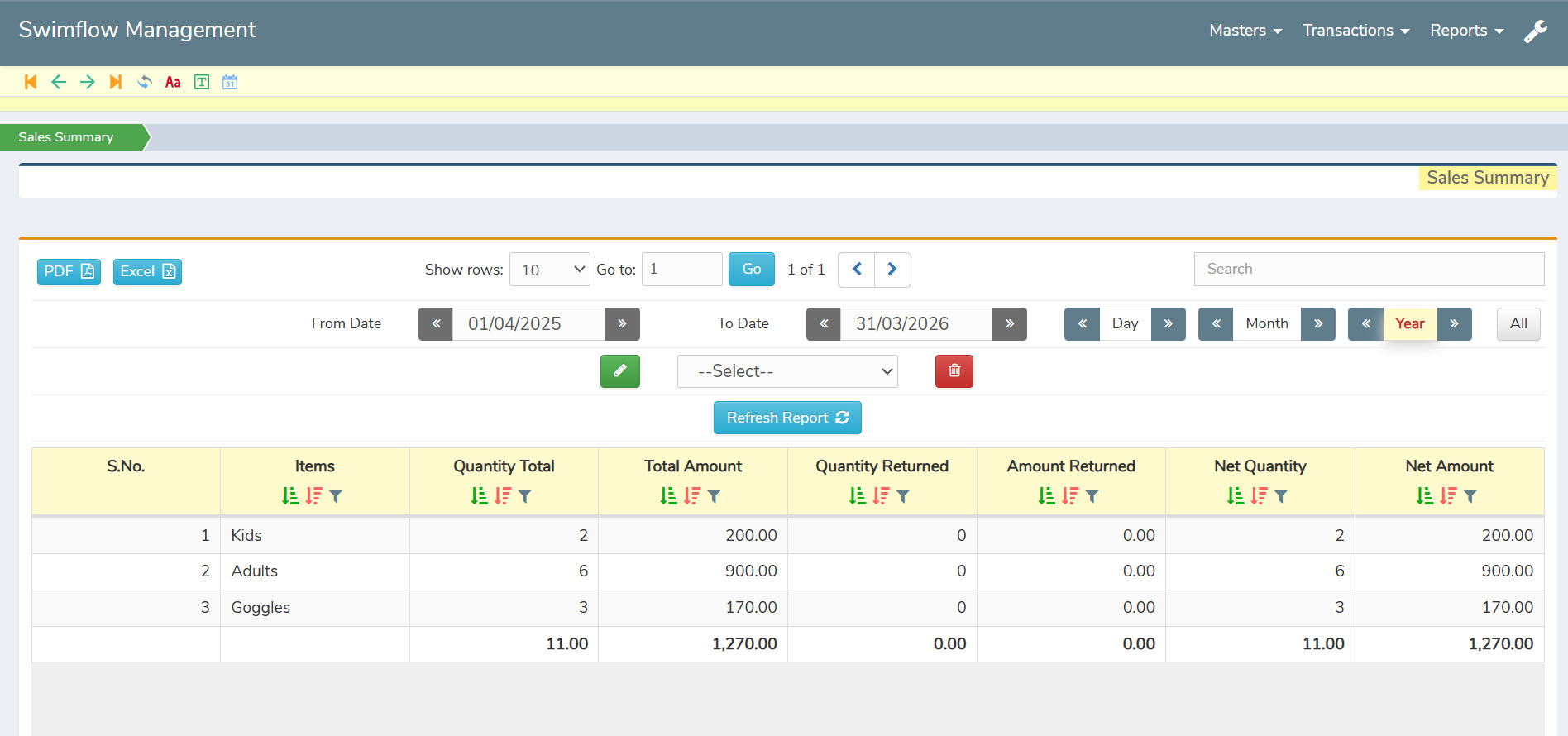
The Sales Summary section provides a quick and simple overview of all sales completed within a selected time period. It is designed for easy understanding, showing only the minimal yet essential details needed to review sales performance without overwhelming information.
You can sort the summary by specific dates or time ranges, making it convenient to track sales for daily, weekly, or monthly analysis. This helps in getting a clear snapshot of how the sales are progressing over time.
The summary includes key columns like quantity sold, quantity returned, amount paid, and amount returned, giving a straightforward view of all transactions. This makes it easy to monitor sales trends and maintain accurate records effortlessly.
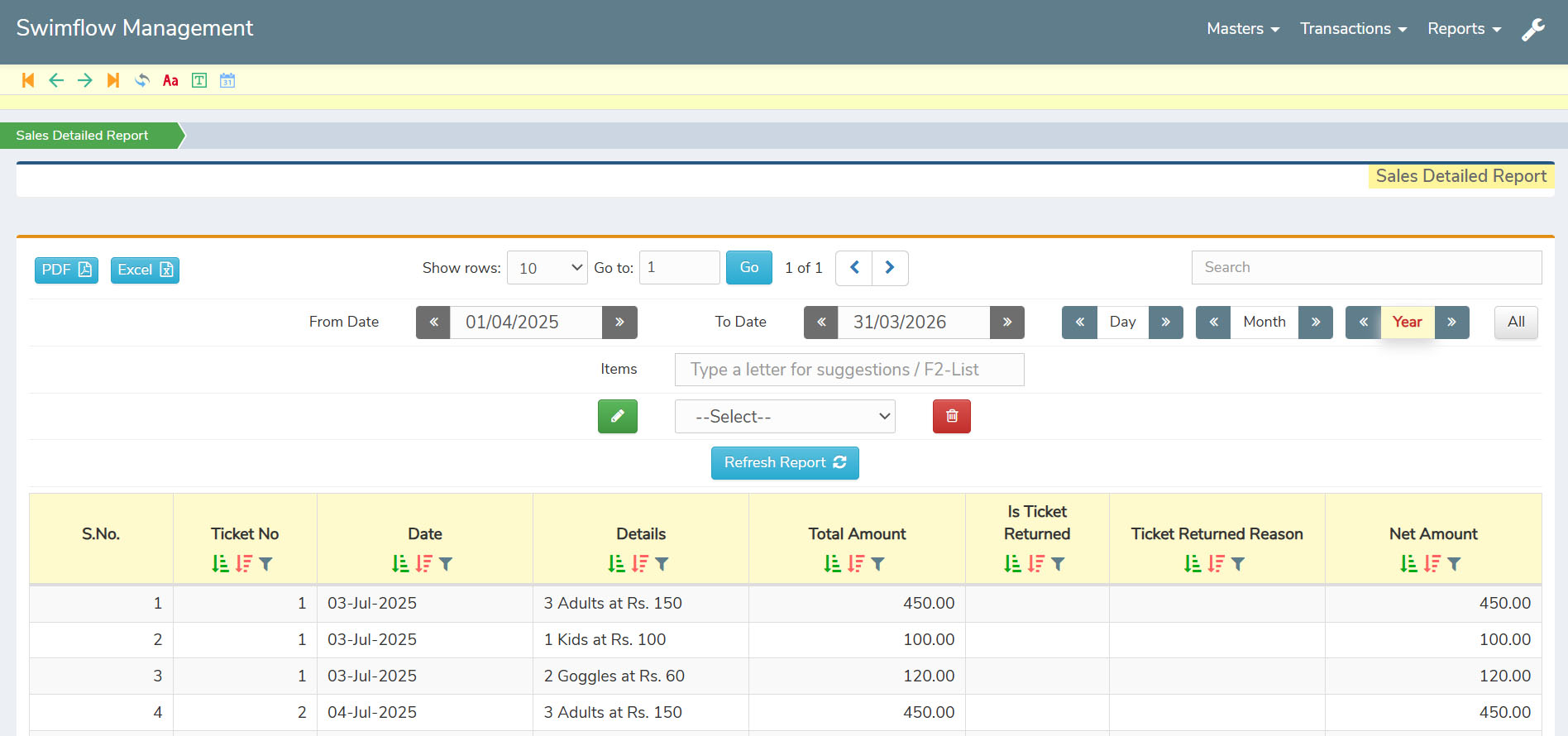
The Sales Detailed Report provides a complete breakdown of every transaction, offering a clear view of each ticket purchased, item bought, and ticket returned. It ensures that no detail is missed, giving full transparency on all sales activities.
Along with purchase details, it also records the reason for ticket returns, helping staff understand and address customer concerns more effectively. This detailed insight makes it easier to track and manage both sales and returns.
For better communication and record-keeping, the entire report can be exported in PDF or Excel format, allowing quick sharing, analysis, or storage whenever needed. This makes sales reporting thorough and professional.
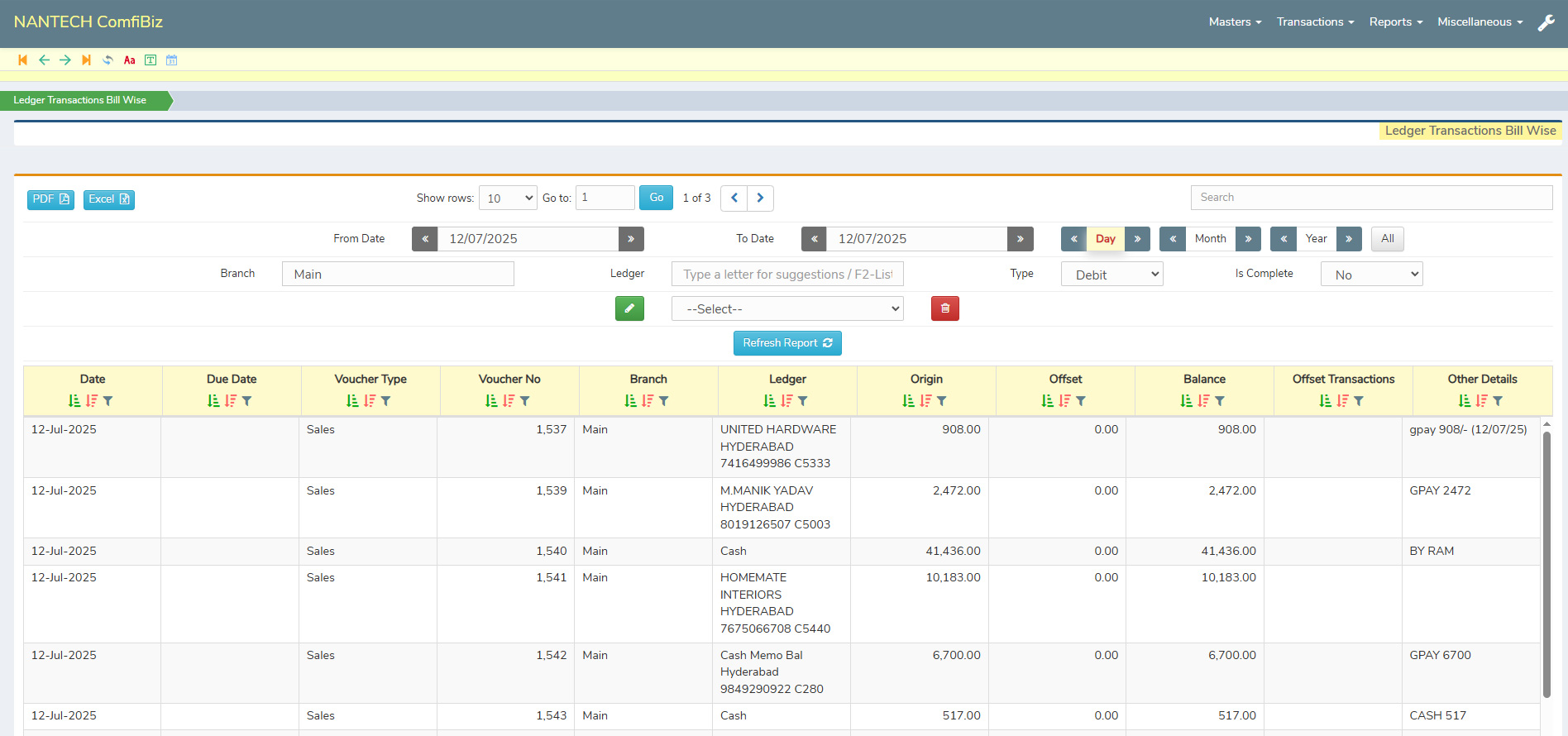
The Reporting Section in the SwimFlow Management web application allows users to filter, search, and sort data across all reports with ease. You can quickly find relevant entries by date, ticket sales, coaching enrollments, expenses, and more.
This section helps businesses manage their operations effortlessly, offering clear visibility into each transaction. All records can be exported in PDF or Excel, making it simple to audit, analyze, or share when needed.
All reports are fully customizable based on client needs, offering flexibility in layout, filters, date ranges, and output formats (PDF/Excel) — ensuring every facility gets the insights they need, exactly how they need them.
Please feel free to contact us and let us discuss over a cup of coffee
Second Floor, Rokhade Building,
Beside Sukruti Commerce College,
Shirur Park Main Road, Vidya Nagar,
Hubli. Karnataka 580021 , India.


